Testing Methodologies and best practices
Testing Methodologies and best practices
This post is a summary of a lecture given by me and Alex. Alex comes from the QA side, I come from backend, so we ended up covering testing from both angles: why it matters, what tools we actually use, and how to make it stick in real projects.
Why Write Tests at All?
Tests shorten the feedback loop. That’s it. That’s the whole business case.
You ship a feature, bump some dependencies, swap Stripe for another payment processor — and you need to know nothing broke. Tests give you that. They also save money, because catching a bug before production is always cheaper than catching it after. Every testing decision we talk about below comes back to one thing: shortening the feedback loop for the developer.
The Testing Pyramid: Types of Tests
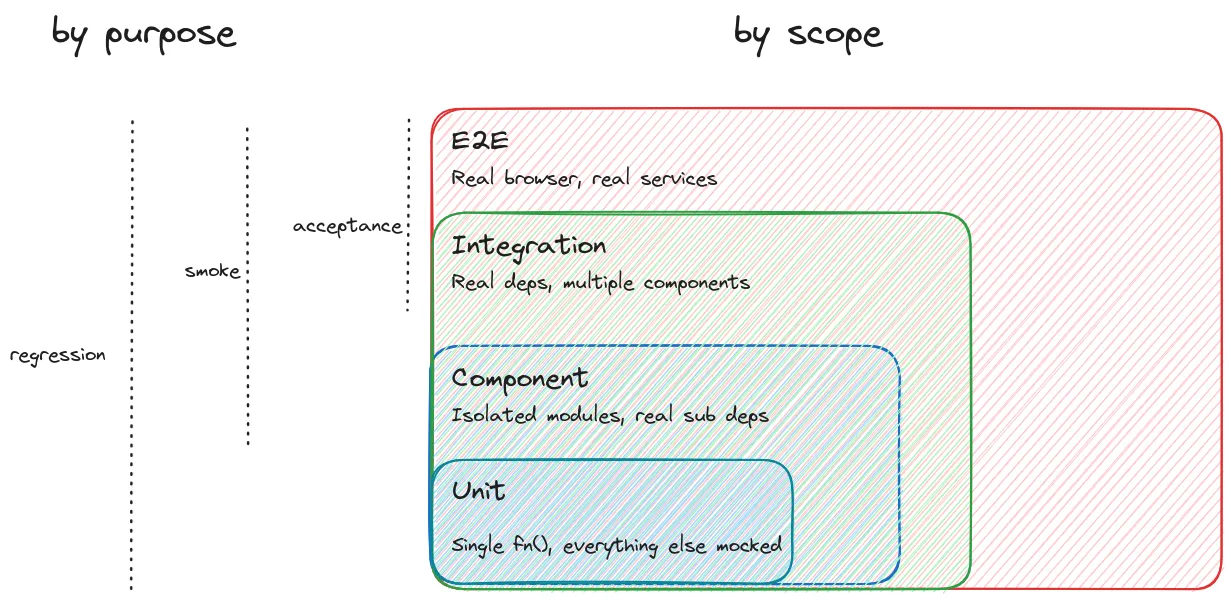
Unit Tests
A unit test verifies a single function in isolation. Everything around it — dependencies, external calls, database — gets mocked or stubbed out. You’re only testing the logic inside that one function.
// Example: testing a createProvider function with Vitest
describe("createProvider", () => {
  it("should return null when no provider specified", () => {
    expect(createProvider({})).toBeNull();
  });

  it('should thorow on invalid string provider', async () => {
    await expect(
      createProvider({ provider: 'invalid' as any, apiKey: 'key' })
    ).rejects.toThrow('Unknown provider "invalid"')
  })
});
They’re fast and granular. You can run them in watch mode while you code, and the moment something breaks you see it right away — no waiting for CI.
Component Tests
One level up. The key difference is that you don’t mock internal dependencies. If your module calls several internal functions, those calls happen for real. You treat the whole component as a black box: given these inputs, do I get the right output?
In a microservice setup, a component test would cover an entire service. Send a request in, check what comes back.
Integration Tests
Here you’re checking that multiple components actually work together. You use real dependencies, but external third-party services (like Stripe) stay mocked. You don’t want your tests to be flaky just because some vendor’s API was slow that day.
End-to-End (E2E) Tests
Nothing is mocked. A real browser connects to a real backend that talks to a real database. You’re simulating what an actual user would do.
Mocks vs. Stubs vs. Spies
People use these words interchangeably, but they do mean different things:
- Stubs give you canned responses. You replace the real logic with a hardcoded return value.
- Mocks are about verifying interactions. Was this method called? With what arguments? How many times?
- Spies are like mocks, except the original function still runs. You just get to see how it was called.
In practice, frameworks like Jest, Vitest, and Cypress blur these lines quite a bit, and the terminology shifts between ecosystems.
Tools of the Trade
Vitest (and Jest) for Unit and Integration Tests
Vitest is what we use for JS/TS projects. It’s fast, and it comes with mocking, stubbing, watch mode, and coverage out of the box. Jest does the same things and has been around longer, so you’ll see it in a lot of existing projects.
import { describe, it, expect, vi } from "vitest";

describe("imageDiff", () => {
  it("should return pixel count 0 for identical images", () => {
    const result = imageDiff(baselineImage, baselineImage);
    expect(result.pixelCount).toBe(0);
  });

  it("should return pixel count > 0 for different images", () => {
    const result = imageDiff(baselineImage, changedImage);
    expect(result.pixelCount).toBeGreaterThan(0);
  });
});
Cypress for UI and E2E Testing
Cypress launches an actual browser, navigates through your app, and you write assertions against what the user would see on screen.
// Component test: mounting a Vue component in isolation
import AppHeader from "./AppHeader.vue";

it("renders the title", () => {
  cy.mount(AppHeader, { props: { title: "Demo Store" } });
  cy.get("[data-cy=page-title]").should("have.text", "Demo Store");
});
// E2E test: visiting a real page
describe("Main page", () => {
it("displays the catalog title", () => {
cy.visit("/");
cy.get("[data-cy=page-title]").should("have.text", "Demo Catalog");
});
});Pro tip: Use custom data-cy attributes for selectors instead of CSS classes. CSS selectors are brittle — one styling change and your tests break.
Intercepting Network Requests
One of the things we use a lot in Cypress is request interception. You can catch HTTP requests and either inspect them or replace the response entirely:
// Verify a real API request
cy.intercept("GET", "/api/items").as("getItems");
cy.visit("/");
cy.wait("@getItems").then((interception) => {
  expect(interception.request.url).to.include("limit");
  expect(interception.response.statusCode).to.equal(200);
  expect(interception.response.body.items).to.have.length(3);
});
// Replace a response with a fixture
cy.intercept("GET", "/api/items", { fixture: "items.json" }).as("getItems");
cy.visit("/");
// Now the UI renders data from your fixture, not the real APIThis is really useful when you need to see how your UI handles error responses, timeouts, or weird edge cases from the server.
PyTest or Unittest for Python
Python ships with unittest in the standard library, and it works fine. But most teams we’ve seen end up using PyTest instead — there’s less boilerplate, the assertions are nicer, and there’s a big plugin ecosystem around it. Either way, both handle unit, integration, and component tests. If you need browser-based E2E in Python, Playwright has a Python SDK that’s basically Cypress for the Python world.
Tests in a Microservice Architecture
Say you have the typical setup: frontend talks to an API gateway, gateway routes to various microservices, each with its own database and maybe some external providers.
Where do tests go?
- Unit tests live inside each service, testing individual functions.
- Component tests also live inside each service, but test it as a whole.
- Contract tests verify the connection between two services.
- E2E tests test everything together, possibly with a test DB or Testcontainers.
One thing we kept coming back to in the lecture: don’t test what you didn’t write. Postgres, Nginx, Redis — they already have their own test suites. Trust them.
When to Test: CI or It Didn’t Happen
If you’re using GitHub Flow, testing happens in pull requests. Your CI (GitHub Actions, Jenkins, whatever) builds the app, spins up what it needs, and runs the suite. If it’s green, you merge.
Here’s the thing though: if tests aren’t enforced at the CI level, you might as well not have them. You cannot rely on people voluntarily running tests before they push. It just doesn’t happen consistently enough.
For monorepos, you can get clever and build a dependency graph so you only run tests for changed packages and their dependents. But before an actual release, run the full suite.
Who Tests the Tests?
Code Coverage
Coverage tells you what percentage of your code is actually exercised by tests. It’s useful for finding blind spots — functions or branches that nobody wrote tests for.
npx vitest run --coverageThe problem is that coverage is a terrible quality metric on its own. You can literally import a function, write assert 0 === 0, and the coverage number goes up. Management loves seeing 90% coverage. It means almost nothing without looking at what the tests actually check.
Mutation Testing
This is where mutation testing helps. Stryker (named after the X-Men villain who hunts mutants) takes your code and introduces small changes — “mutants.” It replaces string literals with empty strings, swaps operators, replaces entire function bodies with undefined. Then it runs your tests and sees if any of them notice.
If you replace a function body with undefined and no test fails, that’s a problem.
npx stryker runStryker generates a report showing:
- Killed mutants: your tests detected the change.
- Survived mutants: the change went unnoticed — a gap in your test coverage.
Same as with coverage — don’t chase 100%. Use the report to find the weak spots in your tests and fix those.
Best Practices for Writing Tests
One Test, One Thing
Each test should verify one behavior. If you’re stuffing multiple unrelated assertions into a single test case, you’ll have a bad time when it fails — the failure message won’t tell you which part actually broke.
Stay Atomic
A test should produce the same result whether you run it alone, in sequence, or in a random order. Put your setup and teardown in beforeEach/afterEach hooks, not scattered through the test body.
Stay Isolated
Mock everything that isn’t the subject of your test. You don’t want a failure in some unrelated dependency to show up as a failure in your test.
Don’t Stay Too Happy
When we write tests, we naturally think about the happy path first — valid inputs, everything works. But the unhappy paths are often where the real bugs hide:
- What if a string parameter receives
undefined? - What if the input object is empty?
- What if the function throws — does it throw the right error?
it("should throw when precision is negative", () => {
  expect(() => calculatePi(-1)).toThrow("Precision must be positive");
});
Name Tests with “should”
This is a small thing that makes a big difference in practice. When a test called "receives a string from list providers" fails, it reads like a statement of fact — confusing. But "should receive a string from list providers" immediately tells you what was expected and didn’t happen.
// Confusing when it fails:
it("returns null when no provider specified", ...);

// Clear when it fails:
it("should return null when no provider specified", ...);
The AAA Pattern: Arrange, Act, Assert
Structure your tests in three phases:
- Arrange: set up the test environment and inputs.
- Act: perform the action being tested.
- Assert: verify the result.
Don’t Keep Tests DRY
I know this sounds wrong, but hear me out. When a test fails, you need to quickly understand what it’s doing. If the test body is three helper functions deep, you end up debugging the test infrastructure instead of the actual code.
It’s genuinely better to copy-paste setup logic across three tests than to build a clever abstraction that makes each test a one-liner nobody can read.
The Pragmatic Approach: Component Tests Over Unit Tests
This was probably the most debated part of the lecture. When you don’t have time to write both, we think you should prefer component tests over unit tests.
Here’s why. Say you have a public calculateCircumference that internally calls a private calculatePi:
# Public API
def calculate_circumference(radius):
    return 2 * calculate_pi() * radius

# Private helper
def calculate_pi():
    # complex implementation
    ...
A unit test on calculate_pi proves the helper works, sure. But a component test on calculate_circumference proves the helper works and that the public contract hasn’t changed. If you later swap out the Pi algorithm, the component test still passes because the behavior didn’t change. The unit test would break.
Unit tests give you feedback the moment you save. Component tests catch things when you run the suite. Both are valuable, but if you have to pick one, component tests give you more coverage per test and break less often when you refactor.
Testcontainers: Real Dependencies Without the Pain
This is one of our favorite topics. The biggest pain point in integration testing has always been managing real dependencies. You could mock the database, but then you’re not actually testing the connection, the query compatibility, or your migrations.
Testcontainers solves this by spinning up real Docker containers for your tests:
from testcontainers.postgres import PostgresContainer

# Before all tests: spin up a real Postgres instance
postgres = PostgresContainer("postgres:16")
postgres.start()
database_url = postgres.get_connection_url()

# In your test: use the real database
client = create_client(database_url)
client.execute("INSERT INTO users (name) VALUES ('Alice')")

response = api.get("/users/1")
assert response.json()["name"] == "Alice"

# After all tests: stop the container
postgres.stop()
It supports PostgreSQL, MongoDB, Redis, Kafka, Elasticsearch, and a bunch more. Each test run gets fresh containers on random ports, so you get proper isolation without any manual cleanup.
There’s also a neat detail: Testcontainers spins up a companion container called Ryuk (yes, named after the Death Note character) whose only job is to clean up containers when tests finish. Even if your suite crashes halfway through, Ryuk takes care of it.
If you want maximum isolation, you can spin up a fresh database for every single test (beforeEach instead of beforeAll). It’s slower, but nothing leaks between tests.
WireMock: Mocking External APIs
So Testcontainers covers your internal dependencies (databases, caches). But what about external APIs you don’t control? That’s where WireMock comes in.
WireMock runs as a Docker container and intercepts HTTP requests. You configure it with JSON mappings:
{
  "request": {
    "method": "GET",
    "url": "/hello"
  },
  "response": {
    "status": 200,
    "bodyFileName": "hello.json"
  }
}
What’s cool is that WireMock can be stateful — later responses can depend on what happened in earlier requests. We used this to simulate multi-step authentication flows with payment providers like Plaid.
It also supports response templating, where you can pull data from the request:
{
  "name": "{{jsonPath request.body '$.name'}}",
  "status": "created",
  "uid": "{{randomValue type='UUID'}}"
}
And since Testcontainers has a built-in WireMock module, you can combine them for a complete local testing environment: real databases and predictable external API responses.
OpenAPI-Driven Testing with Schemathesis
If your API has an OpenAPI (Swagger) spec, there’s a neat trick: Schemathesis can generate test requests automatically:
schemathesis run http://localhost:8000/openapi.jsonIt reads the schema and throws everything it can at your server — valid requests, malformed ones, null values, binary strings, even SQL injection attempts. Then it checks that your API handles them gracefully and that responses actually match the documented schema.
You get surprisingly broad coverage without writing a single test by hand.
Test-Driven Development (TDD)
TDD flips the normal workflow on its head. You write the tests first, then write the code.
- Write the test — describe what the function should do before it exists.
- Watch it fail — there’s no implementation yet, so of course it fails.
- Write the code — just enough to make the test pass.
# Step 1: Write the test first
def test_should_return_3_14_with_precision_2():
    assert calculate_pi(precision=2) == 3.14

def test_should_fail_with_negative_precision():
    with pytest.raises(ValueError):
        calculate_pi(precision=-1)

# Step 2: Now implement the function
def calculate_pi(precision=5):
    if precision < 0:
        raise ValueError("Precision must be non-negative")
    # implementation...
What we like about TDD is that it turns tests into a design tool. You’re basically writing a specification before you write the implementation. This also pairs really well with AI coding assistants — you write the tests (because you understand the requirements), then let the AI generate code that satisfies them. The tests act as a feedback loop that keeps the generated code honest.
Managing Environments: Secrets and Configuration
Once you have production, development, sandbox, E2E, and local test environments, managing environment variables turns into a real headache. Tools like Doppler or Infisical help by centralizing everything:
- All secrets in one place, with per-environment configs.
- You can diff configs across environments to spot mismatches.
- Runtime injection:
doppler run -- python main.py. - Plugs into CI/CD pipelines.
If you need to self-host, HashiCorp Vault is the go-to.
Monitoring in Production: Synthetic Testing
Testing doesn’t stop once you deploy. Tools like Checkly let you run synthetic tests against your live production environment on a schedule:
- HTTP checks — are your API endpoints actually responding?
- Browser checks — Playwright scripts that log in, click through flows, verify what’s on screen. These run from multiple geographic locations.
When something breaks, you find out from an alert, not from a user complaint.
Wrapping Up
If there’s one thing to take away from this, it’s that tests exist to shorten the feedback loop. Everything else follows from that.
Enforce them in CI. Prefer component and integration tests when you can’t write everything. Use Testcontainers so you’re testing against real databases, not mocks. Use mutation testing to check that your tests actually test something. Try TDD, especially if you’re working with AI coding tools. Keep test code readable even if it means repeating yourself. Name your tests with “should.” And always, always test the unhappy paths — that’s where the real bugs live.